HTML Table Elements
<table> — The HTML Table Element
The <table> tag defines an HTML table. An HTML table consists of one
<table> element and one or more <tr>, <th>,
and <td> elements.
Code
<table>
  <tr>
    <th>Name</th>
    <th>Score</th>
  </tr>
  <tr>
    <td>Alice</td>
    <td>95</td>
  </tr>
  <tr>
    <td>Bob</td>
    <td>88</td>
  </tr>
</table>
Output
| Name | Score |
|---|---|
| Alice | 95 |
| Bob | 88 |
<thead> — Table Head Group
The <thead> tag is used to group header content in an HTML table.
It must appear as the first child of a <table> element and wraps one or more
<tr> rows that form the column headings.
Code
<table>
  <thead>
    <tr>
      <th>Subject</th>
      <th>Units</th>
    </tr>
  </thead>
  <tbody>
    <tr>
      <td>Web Design</td>
      <td>3</td>
    </tr>
  </tbody>
</table>
Output
| Subject | Units |
|---|---|
| Web Design | 3 |
<tbody> — Table Body Group
The <tbody> tag is used to group the body content in an HTML table.
It separates the main data rows from the header (<thead>) and footer
(<tfoot>) sections, and improves browser rendering and accessibility.
Code
<table>
  <thead>
    <tr><th>Item</th><th>Price</th></tr>
  </thead>
  <tbody>
    <tr><td>Notebook</td><td>₱50</td></tr>
    <tr><td>Pen</td><td>₱15</td></tr>
    <tr><td>Eraser</td><td>₱10</td></tr>
  </tbody>
</table>
Output
| Item | Price |
|---|---|
| Notebook | ₱50 |
| Pen | ₱15 |
| Eraser | ₱10 |
<tfoot> — Table Foot Group
The <tfoot> tag is used to group footer content in an HTML table.
It typically holds summary rows such as totals or references, and should appear after
<tbody> in the source order.
Code
<table>
  <thead>
    <tr><th>Item</th><th>Price</th></tr>
  </thead>
  <tbody>
    <tr><td>Notebook</td><td>₱50</td></tr>
    <tr><td>Pen</td><td>₱15</td></tr>
  </tbody>
  <tfoot>
    <tr><td>Total</td><td>₱65</td></tr>
  </tfoot>
</table>
Output
| Item | Price |
|---|---|
| Notebook | ₱50 |
| Pen | ₱15 |
| Total | ₱65 |
<tr> — Table Row
The <tr> tag defines a row in an HTML table.
A <tr> element contains one or more <th> or
<td> elements that fill the columns of that row.
Code
<table>
  <tr>  <!-- Row 1 -->
    <td>Row 1, Col 1</td>
    <td>Row 1, Col 2</td>
  </tr>
  <tr>  <!-- Row 2 -->
    <td>Row 2, Col 1</td>
    <td>Row 2, Col 2</td>
  </tr>
</table>
Output
| Row 1, Col 1 | Row 1, Col 2 |
| Row 2, Col 1 | Row 2, Col 2 |
<td> — Table Data Cell
The <td> tag defines a standard data cell in an HTML table.
The text in <td> elements are regular weight and
left-aligned by default — unlike <th> cells which are bold and centered.
Code
<table>
  <tr>
    <td>Regular text (default)</td>
    <td>Left-aligned (default)</td>
  </tr>
</table>
Output
| Regular text (default) | Left-aligned (default) |
Notice that <td> text is plain and flush-left — no bold, no centering. Compare this to <th> in the next card.
<th> — Table Header Cell
The <th> tag (not to be confused with the <thead> tag)
defines a header cell in an HTML table. The text in <th> elements
are bold and centered by default, visually distinguishing them
from data cells.
Code
<table>
  <tr>
    <th>Bold & Centered (default)</th>
    <th>Another Header</th>
  </tr>
  <tr>
    <td>Regular & Left-aligned</td>
    <td>Another Cell</td>
  </tr>
</table>
Output
| Bold & Centered (default) | Another Header |
|---|---|
| Regular & Left-aligned | Another Cell |
<thead> is a grouping element that wraps one or more rows — it has no visual effect by itself. <th> is a cell element that makes its content bold and centered. They serve different purposes.
Full Table Example — Subaru Impreza STi 22B
The table below combines all seven elements: <table>, <thead>,
<tbody>, <tfoot>, <tr>, <td>,
and <th>. Styled via Lect3.css:
border: 1px groove black on all table elements.
Code
<table>
  <thead>
    <tr><td><b>NAME:</b> DESUYO, CHARLES IÑIGO G.</td></tr>
    <tr><td><b>SECTION:</b> ITBD</td></tr>
    <tr><td><b>DATE TODAY:</b> 02/05/2026</td></tr>
  </thead>
  <tbody>
    <tr>
      <th style="text-align: center;">Subaru Impreza STi 22B</th>
    </tr>
    <tr>
      <td>
        <figure>
          <img src="..." alt="Subaru Impreza STi 22B">
          <figcaption>...</figcaption>
        </figure>
      </td>
    </tr>
  </tbody>
  <tfoot>
    <tr><td><i>Reference: ...</i></td></tr>
  </tfoot>
</table>
Output
| NAME: DESUYO, CHARLES IÑIGO G. |
| SECTION: ITBD |
| DATE TODAY: 02/05/2026 |
| Subaru Impreza STi 22B |
|---|
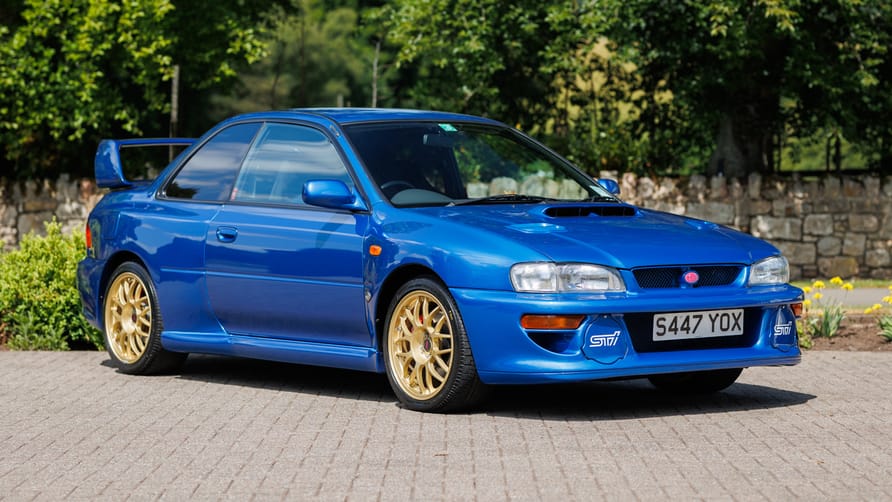
|
| Reference: Gear, T. (2023, August 31). This ex-Colin McRae Subaru Impreza STi 22B has sold for almost half a mill. Top Gear. https://www.topgear.com/car-news/retro/ex-colin-mcrae-subaru-impreza-sti-22b-has-sold-almost-half-mill, W3Schools.com. (n.d.). https://www.w3schools.com/tags/ |